Eventscribe Release Notes
March 2026
PLEASE NOTE
This page will be updated throughout the month as new releases are deployed, so check back regularly for the latest updates and improvements.
This month's release may include product updates, new features, enhancements, essential bug fixes, and more.
New
Eventscribe Mobile App & Website – Appointments Are Now Available
The Eventscribe Appointments feature lets attendees move from Chats to scheduled one-on-one meetings directly within the event's Mobile App and Website (Fig. 1). Appointments appear in the attendee's My Schedule alongside sessions and presentations for a unified event agenda. For more information, review our Chats & Appointments documentation. (March 24, 2026)
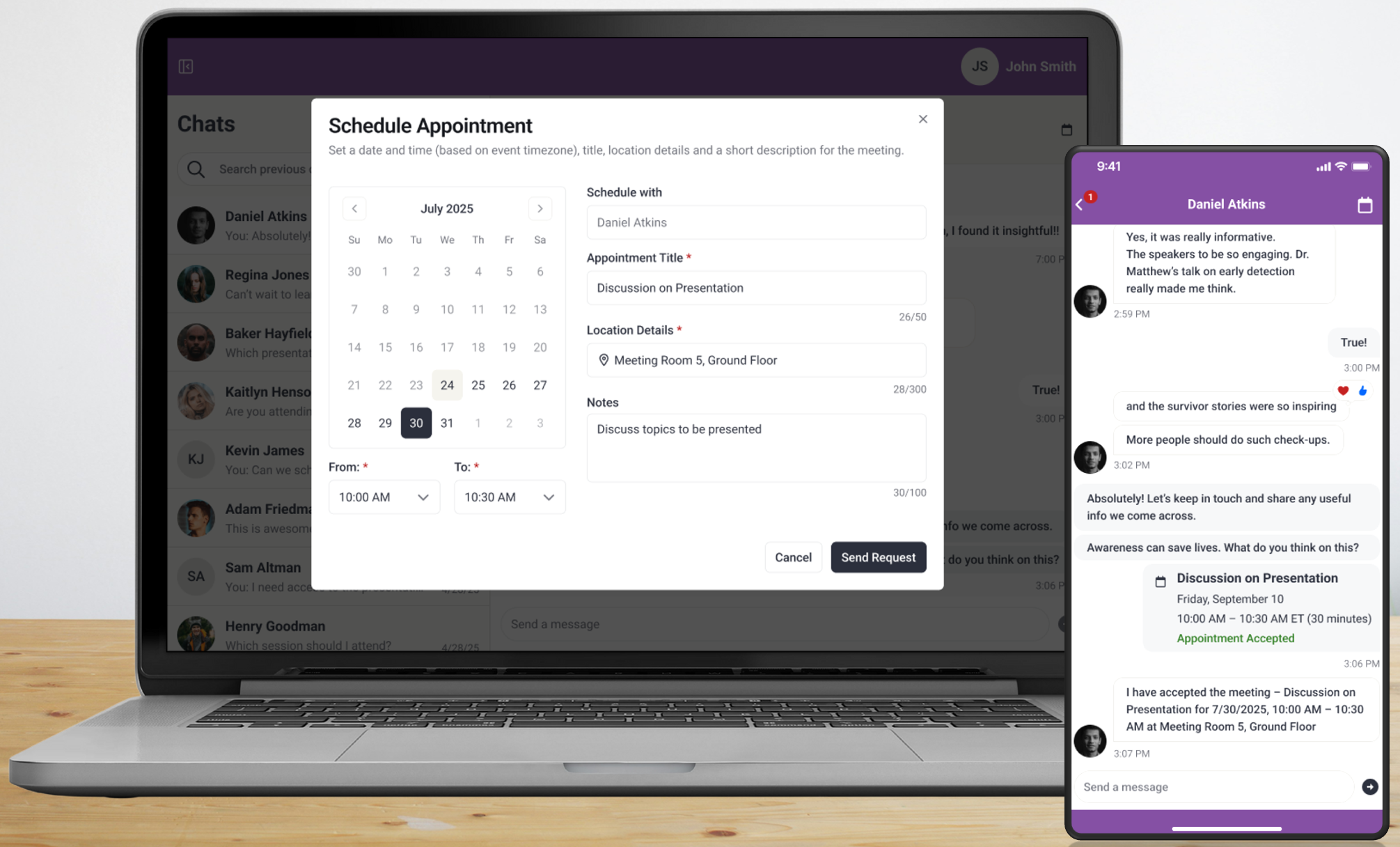
Fig. 1 - Appointments in Eventscribe Website and Mobile App.
Enhancement
Eventscribe Mobile App (iOS & Android) – Performance and Startup Improvements
This release includes several updates designed to improve overall app speed and responsiveness.
Key updates include:
- Faster App Launch – The mobile app now launches significantly faster after being closed.
- Improved Login Performance – Authentication and event data loading have been optimized, allowing users to reach the home screen more quickly after logging in.
- Improved Data Loading – Schedule, speakers, attendees, and other browsing areas now load more efficiently.
- Improved Responsiveness – The app interface remains responsive while data loads in the background, reducing delays when navigating between areas.
- Stability Improvements – Several issues that could cause loading delays or interface freezes during startup have been addressed.
These updates improve overall reliability and provide a faster experience when accessing event information. (Build: 26.03.10) (March 17, 2026)
Updates to Payment Data Formatting
We've enhanced how payment information is processed to improve consistency and reduce potential errors.
- Automatic Formatting Cleanup: Leading/trailing whitespace and dashes are now automatically removed before payment data is sent to the processor.
- Improved Reliability: This helps ensure data is transmitted in a clean, standardized format, reducing the risk of processing issues.
(March 18, 2026)
Eventscribe Website – Updated Button Label on Dashboard
We've updated the dashboard to make it easier to find and launch your event website. The "Launch eventScribe" button has been renamed to "Launch Website" for clarity (Fig. 2). Admin and user launch options have also been updated to match. (March 25, 2026)
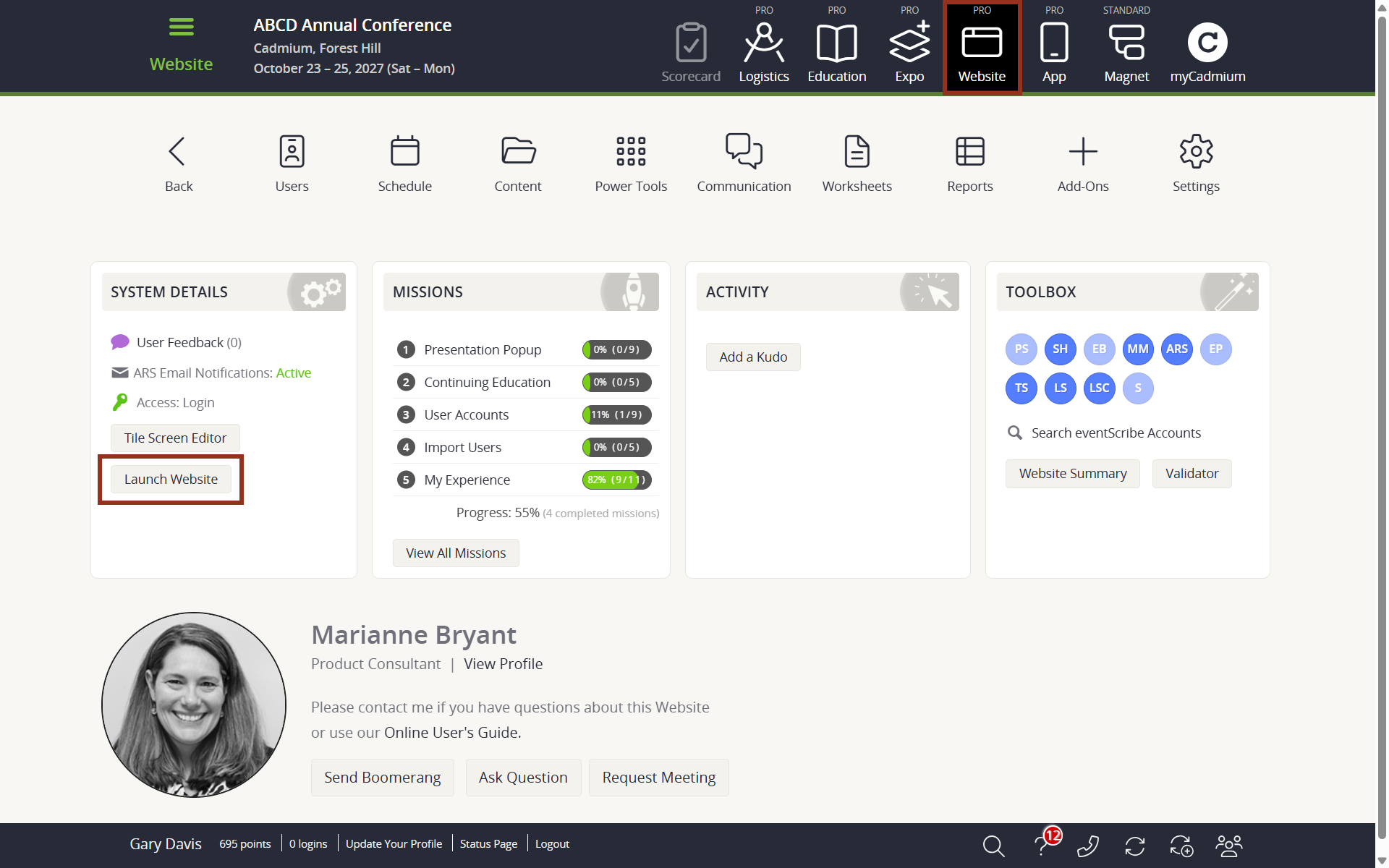
Fig. 2 - Website Dashboard Launch Website Button.
Eventscribe Website – Improvements to My Schedule Page
With the release of our Eventscribe Appointments feature, we have updated the My Schedule page to provide a similar experience with our mobile app. The My Schedule experience has been updated to display attendee's scheduled content only, instead of all favorited content. Scheduled content includes: Presentations, Posters, and Appointments (when applicable). Any favorited content that is not considered scheduled content, such as exhibitors and users, have been removed from the My Schedule page and can be accessed in different areas of the website (see My Experience Navigation release notes below for an update). Overall the changes to the My Schedule page were made to unify the experience between the event Website and event Mobile App. (March 25, 2026)
Eventscribe Mobile App – Improvements to My Schedule Page
With the release of our Eventscribe Appointments feature, we have updated the My Schedule page to provide a similar experience with our website. The My Schedule experience has been updated to provide a single, organized view of an attendee's scheduled content. Previously, the My Schedule screen only included favorited Presentations, and it now includes favorited Posters and Appointments (when applicable). Users will see a tab at the bottom of the screen that allows them to navigate between My Schedule, Presentations, Posters, and Appointments. Overall the changes to the My Schedule page were made to unify the experience between the event Mobile App and Website. (March 25, 2026)
Eventscribe Website – Improvements to My Experience Navigation
With the updates to the My Schedule experience, we have updated the My Experience page to better help users navigate their favorited content. The My Exhibitors card previously redirected users to the My Schedule page, now redirects users to the Browse by Booth page filtered to the user's favorited exhibitors. (March 25, 2026)
Fix
Eventscribe Mobile App (iOS & Android) – Speaker Email Display Restored
An issue was resolved where speaker email addresses were not appearing in the mobile app even when they were provided. Email information now displays correctly on speaker profiles, and the settings that control the visibility of email details and related navigation options now function as expected. (Build: 26.03.10) (March 17, 2026)
Eventscribe Mobile App (iOS) – Improved Poster Profile Clarity
An issue was resolved where a blank placeholder appeared in a poster presenter's profile when no ePoster was uploaded, which could cause confusion. The empty outline has been removed to provide a cleaner and more intuitive profile experience. (Build: 26.03.10) (March 17, 2026)
Eventscribe Mobile App (iOS & Android) – Super Session Stability in Browse by Day
An issue was resolved where the app could close unexpectedly when viewing Browse by Day while the Super Sessions setting was enabled. The schedule now loads correctly when Super Sessions are used. Presentations will appear in Browse by Day when the required Super Session information is provided, including the Super Session name, start and end time, and display order. Presentations without this information will continue to appear in other browsing views such as Browse by Title and Search. (Build: 26.03.10) (March 17, 2026)
Eventscribe Mobile App (iOS) – Sub-Page Banner Display Stability
An issue is resolved where rotating sub-page banners could display inconsistently on iOS. Banner animations and transitions now load smoothly, ensuring a stable and polished visual experience throughout the app. (Build: 26.03.24) (March 25, 2026)
Education Harvester – Task List Shows Incorrect Due Date Grammar
Fixed the Tasks Due Date messaging across 4 files to display the correct verb tense:
- Task is due [date] – shown on the due date or in the future
- Task was due [date] – shown only when the due date has passed
(March 27, 2026)
Was this article helpful?
That’s Great!
Thank you for your feedback
Sorry! We couldn't be helpful
Thank you for your feedback
Feedback sent
We appreciate your effort and will try to fix the article