Eventscribe Release Notes
November 2026
PLEASE NOTE
This page will be updated throughout the month as new releases are deployed, so check back regularly for the latest updates and improvements.
This month's release may include product updates, new features, enhancements, essential bug fixes, and more.
Feature
Lead Capture Mobile App 26.11.02 – Event Details Added to App Header
The app header showed only the screen title and user avatar. To check which event, booth, and company they were capturing leads for, users had to open License Details from the More screen. The header now shows the event name on the first line and the booth number and company on the second, on every main screen and sub-screen. When a name is too long to fit, swipe the header to see the full text. It returns to its starting position after 3 seconds. Page titles are also updated: the Leads screen shows your lead count next to the title, and detail screens such as Lead Details and Leads by Day include a back arrow. (November 3, 2026)
Education Harvester – Blank Credentials When Speakers Select 'Not Applicable'
Speakers without credentials no longer show "n/a" after their names on the event website and mobile app. Your speaker listings now look cleaner and more professional.
Education Harvester now recognizes entries like n/a, NA, and Not Applicable, and it leaves credentials blank. This works on both the Profile and Presenters tasks. When speakers return to the Profile task, the Not applicable box stays checked if credentials are required. Real credentials, like "MA, NA", stay exactly as entered. (November 5, 2026)
Expo Harvester – Filter Exhibitor Tasks by Booth Size
You can now assign tasks to exhibitors based on booth size. Previously, tasks couldn't tell an outdoor 10x10 booth apart from a regular 10x10 booth.
The task editor has a new Booth Size filter, just below Booth Opportunity. Pick one or more sizes, and choose a booth type to target outdoor booths alone. Each option shows how many booths it covers. The filter works alongside your other task filters and appears in the View Tasks Filter column. (November 5, 2026)
Education Harvester - Drag-and-Drop Task Reordering
Customers asked for a faster way to reorder tasks while setting up their events. Arranging tasks took significant setup time.
The admin task lists for Speaker, Poster, and Expo management now show a drag handle in the default "Focus: Task Status" view (Fig. 1). Dropping a task saves the new order right away. Dragging is not saved while search or the Hide and Status filters are hiding rows. (November 6, 2026)
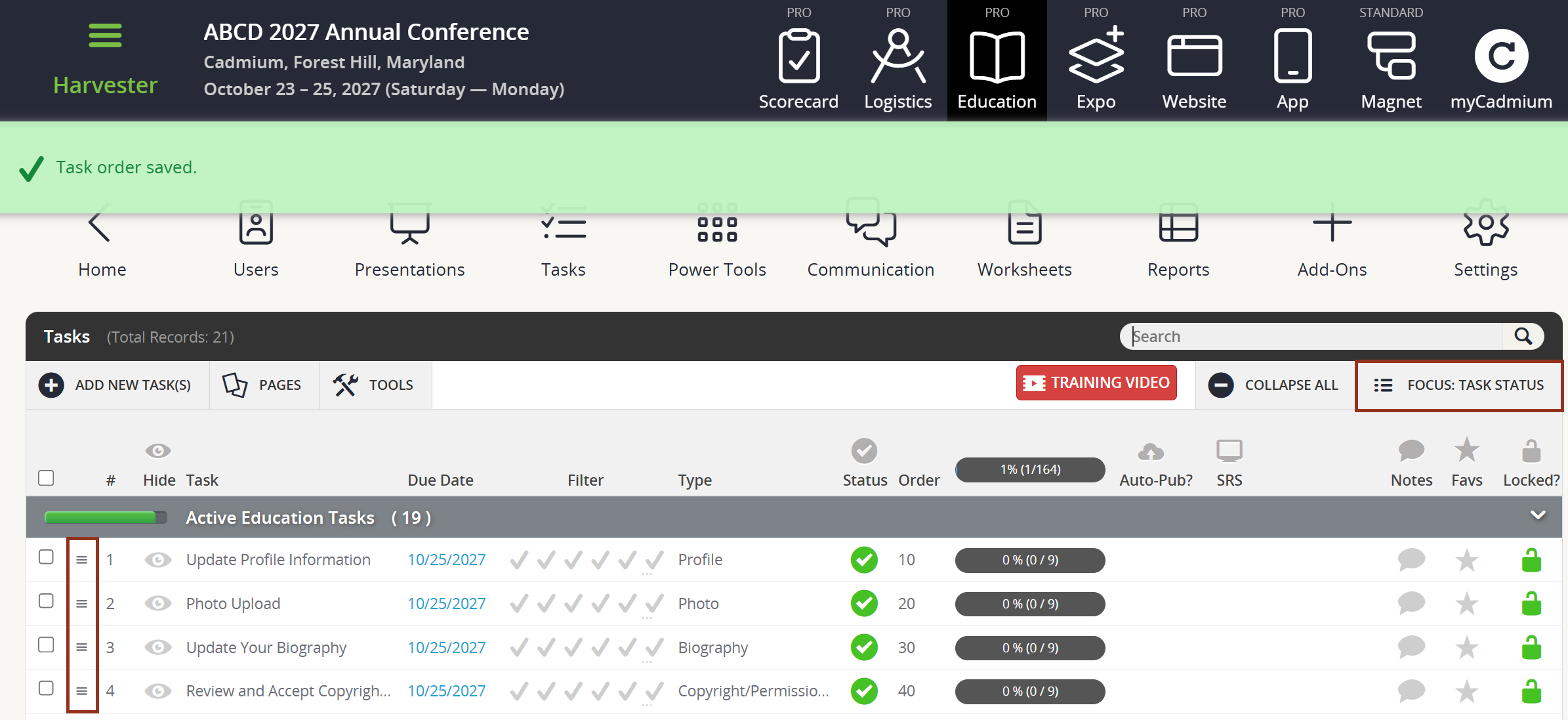
Fig. 1 - Harvester Task Page.
Improvement
Education Harvester – Filters Added to Permissions Task Report
The Permissions Task Report could only be downloaded in bulk, as one PDF with every signed agreement for the event. Finding a single agreement meant digging through the whole file.
You can now filter the Permissions Task Report by individual user, role, or build code. Pull one speaker's signed agreement in seconds, even for large events. (November 2, 2026)
Education Harvester – New Communications Module Hotkey - Incomplete Tasks with Due Date
Administrators could list a speaker's incomplete tasks in emails, but the list showed no due dates. There was also no way to list only the tasks a speaker was late on.
We added a new hotkeys to the Communication module's email editor that lists incomplete tasks with due dates next to the task. Due dates follow each speaker's own date, course-specific dates, or the overall task due date, matching what speakers see on their homepage. (November 2, 2026)
Education Harvester – Past Due Task List Hotkey
Administrators could list a speaker's incomplete tasks in emails, but they could not only highlight past due tasks.
We added a new hotkey to the Communication module's email editor that lists incomplete past-due tasks only (@@@@PASTDUETASKLIST@@@@). The hotkey will list the incomplete task and the due date. (November 2, 2026)
Education Harvester – Reviewer Recusals Shown and Emailed to Admins
Administrators could not tell at a glance whether a reviewer's reviews were incomplete or recused. They also had no timely way to learn about a recusal and reassign the review.
The Reviewer list now includes a Recusals column with a filter and a warning icon showing each reviewer's recused review count. The Reviewer - Uploads task also has a new Recusal Notification Email(s) field. When a reviewer recuses, those addresses receive an email naming the reviewer, presentation, and task. (November 2, 2026)
Lead Capture Mobile App 26.11.02 – Minimum Device Requirements Updated
Devices running an operating system below the published minimum could still install the app and activate a license, but the intended app functionality was not fully supported. Lead Capture now requires Android 13 or later, or iOS 15.0 or later, and devices running an earlier operating system can’t install version 26.11.02 or later. For steps to check a device’s operating system version, see Lead Capture Mobile App Device Requirements. (November 3, 2026)
Eventscribe Live App - Retired (iOS & Android)
The Eventscribe Live app for iOS has been retired and removed from the App Store. Livestreams and on-demand video continue to play on the Eventscribe Website and in the Eventscribe App. Scavenger Hunt in the Eventscribe App is not affected. (November 4, 2026)
Cadmium Identity – Email Confirmation When Your Password Changes
When a password is changed, Cadmium Identity now sends a confirmation email to the account's email address. If the user didn't make the change, the email directs them to reset their password and contact support. (November 4, 2026)
Fix
Education Harvester – Air Travel Task Admin Emails Now Send
When an email was entered in the Auto-Email Administrator(s) setting on the Air Travel Flights task, no confirmation email arrived. Other task types worked, so the only workaround was turning on emails for every completed task.
We corrected the Air Travel Flights, Air Travel, and Photo tasks so they now send the administrator email when a speaker completes the task. Administrators can again be notified only for the tasks they choose. (November 2, 2026)
Education Harvester – Message to Reviewers Box Now Opens on Every Presentation
Speakers with more than one presentation to upload for review could only add a message on the first one. On any additional presentation, the "Send a Message to the Reviewers" box wouldn't open.
The message box now opens for every presentation a speaker uploads for review. Speakers can send a note to reviewers on each one, not just the first. (Nov. 3, 2026)
Lead Capture Mobile App 26.11.02 – App No Longer Stuck Syncing When Switching Licenses
If a user selected a license whose booth had been unassigned or deleted and then selected a different, valid license, leads scanned afterward failed to sync. The app then stuck on the "Syncing your data to the cloud" screen, and the user couldn't log out or switch licenses. We corrected how the Select License screen saves the selected license, so leads now sync to the correct event. When the event, company, or booth tied to a license has changed, the screen shows a "License No Longer Valid" message with the license ID, which you can copy and share with support. (November 3, 2026)
Cadmium Identity – Account Now Locks After Six Incorrect Password Attempts
Cadmium Identity allowed seven incorrect password attempts before locking an account, one more than the intended limit of six. The account now locks on the sixth incorrect password attempt instead of the seventh. The lockout itself works the same as before. (November 4, 2026)
Was this article helpful?
That’s Great!
Thank you for your feedback
Sorry! We couldn't be helpful
Thank you for your feedback
Feedback sent
We appreciate your effort and will try to fix the article