Eventscribe Release Notes
July 2026
PLEASE NOTE
This page will be updated throughout the month as new releases are deployed, so check back regularly for the latest updates and improvements.
This month's release may include product updates, new features, enhancements, essential bug fixes, and more.
Improvement
Updated Branding in Eventscribe Registration
Eventscribe Registration now features refreshed Cadmium branding, including updated colors and icons for a more modern, cohesive look (Fig 1). This update aligns Registration more closely with the broader Cadmium platform and improves visual consistency across products. There are no changes to functionality or workflows; everything works exactly as it did before. (July 8, 2026)
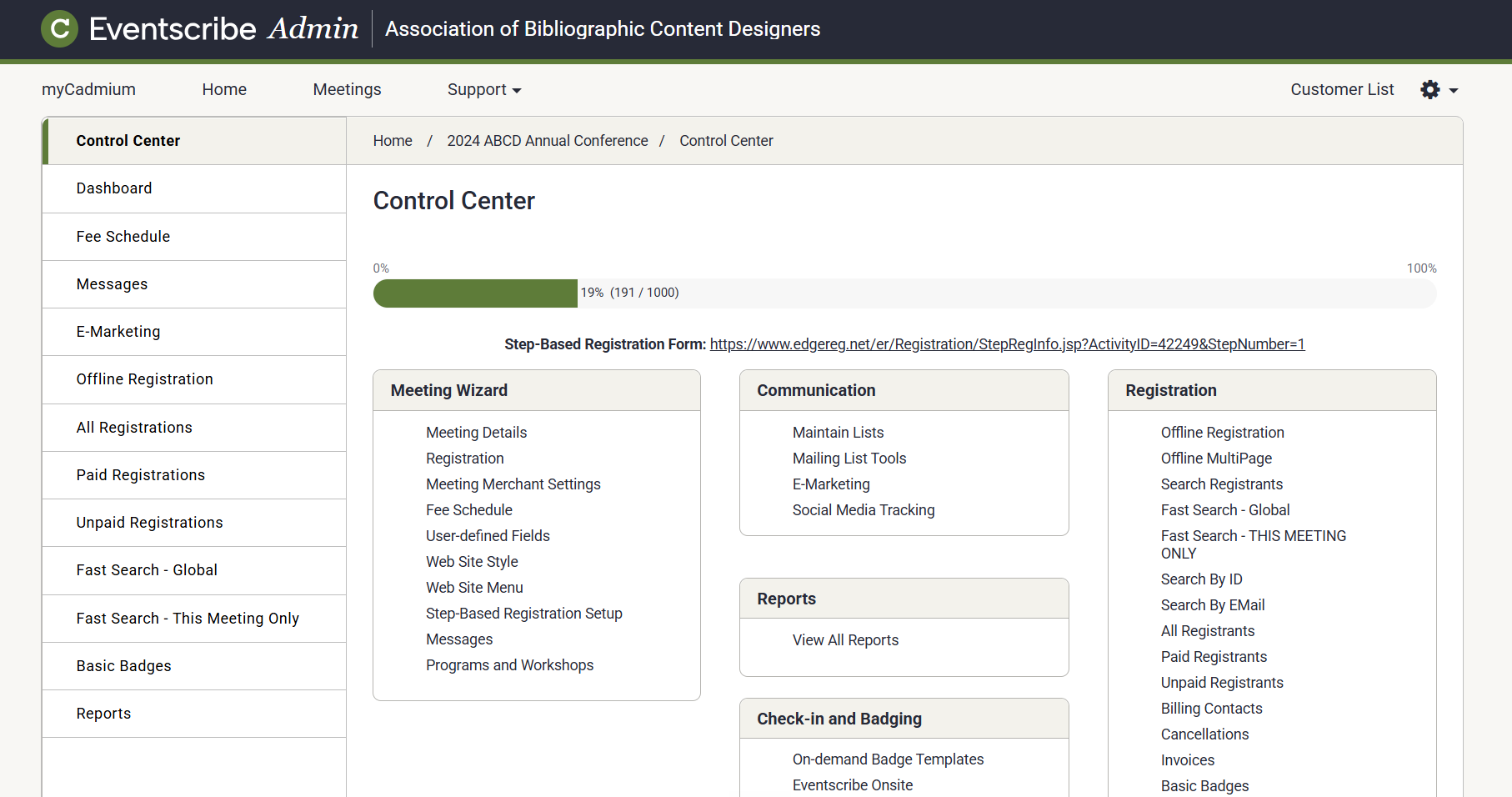
Fig. 1 - Updated branding in Eventscribe Registration.
Website and App – Duplicate User Warning on the User List Page
In support of our unique user initiative, the User List page in Eventscribe Website and Mobile App Admin portal now checks for existing users when you add a new user. If you try to add a user who already exists for the event (matched by email address, or by Member ID for SSO-managed accounts) you'll now see a warning message that the user already exists. (July 13, 2026)
Website and App – Duplicate Email Blocked When Editing a User on the User List Page
In support of our unique user initiative, editing an existing user on the user list in Eventscribe Website and Mobile App Admin Portal now enforces uniqueness per event. If you change a user's email address (or Member ID for SSO-managed accounts) to one that already belongs to another user in the event, you'll be notified and the duplicate will not be saved. (July 13, 2026)
Website and App – Import Users Mission Now Enforces Unique Users
In support of our unique user initiative, we've updated the Import Users Mission in Website and Mobile App to enforce user uniqueness. On checkpoint 3, the matching-rule dropdown has been removed; each imported record is now matched against existing event accounts automatically (by email address for non-SSO accounts, and by Member ID for SSO-enabled accounts). When a match is found, the record is merged into the existing account; only genuinely new users are added, and duplicate rows within a single import collapse into one account. (July 13, 2026)
Fix
Education Harvester – Disclosure Report Notes and Favorites Deleted on Recalculate
Notes and favorites entered on the Disclosures task report page were being erased whenever task stats were recalculated. This caused users to unexpectedly lose saved notes and bookmarked favorites.
The issue has been resolved so that recalculating task stats no longer clears notes and favorites on the Disclosures report page. Saved notes and favorites now persist after stats are refreshed. (July 1, 2026)
EventScribe App - 26.06.30 (iOS & Android) – Speaker Middle Initials Now Display
Fixed an issue where speakers' middle initials were not appearing in their name. Middle initials now display correctly wherever a speaker's name is shown. (July 8, 2026)
EventScribe App - 26.06.30 (iOS & Android) – Speaker Phone Button on the Boost Bar Now Works Correctly
Fixed an issue with the speaker phone button in the boost bar, where the button could appear unavailable but was still tappable. The button now displays and behaves correctly, and respects the event's setting for showing speaker phone numbers. (July 8, 2026)
Eventscribe Registration – Valid Job Titles No Longer Rejected on the Registration Form
On the step-based registration form, valid job titles containing characters such as commas, ampersands, slashes, parentheses, or numbers were sometimes being incorrectly rejected with a proper capitalization error when name capitalization was enabled. This issue has been resolved. The Title field now accepts these job titles and no longer applies name-capitalization rules to that field. (July 15, 2026)
Eventscribe Registration – Receipts now show the correct credit card type
An issue was resolved where, in certain scenarios registration receipts could display the wrong credit card brand - for example, showing Mastercard or American Express when a different card was used. Receipts, confirmation and statement emails, and payment reports now show the correct brand for Visa, Mastercard, American Express, Discover, JCB, and UnionPay payments. When a card brand can't be identified, the receipt now shows the masked card number without a brand instead of defaulting to American Express, and these transactions appear under an "Other" card type in reports. (July 17, 2026)
myCadmium – Boomerangs Incorrectly Marked Unread After Refresh
Boomerangs in myCadmium that had already been read were reverting to unread after a browser refresh, forcing users to review the same messages again every time they reloaded the page.
Read status for Boomerangs now stays in sync between the message list and the underlying record, so a Boomerang you've read stays marked as read after a refresh. (July 29, 2026)
Eventscribe Mobile App (iOS) – Engagement Statistics Now Recorded Accurately
An issue was resolved where engagement statistics, including views and taps, were under-reported in the Eventscribe Mobile App on iOS. This affected events on the 26.04.08 build or later, where some user sessions failed to upload and tap counts were under-counted within the sessions that did upload, resulting in lower reported totals. This has been resolved in the 26.07.28 build, and view and tap counts on iOS now record and report as expected. Android was not impacted and continued to record app statistics accurately throughout. (July 30, 2026)
Scorecard – Review Group Selections Can Now be Cleared
On a reviewer's Edit Profile page, once you selected a Review Group from the dropdown, there was no way to remove it. The only option was to replace it with another group.
Review Group dropdowns now include a clear option. Select the "x" to remove an assigned review group, save the profile, and the group stays removed. (July 30, 2026)
Was this article helpful?
That’s Great!
Thank you for your feedback
Sorry! We couldn't be helpful
Thank you for your feedback
Feedback sent
We appreciate your effort and will try to fix the article