Eventscribe Release Notes
April 2026
PLEASE NOTE
This page will be updated throughout the month as new releases are deployed, so check back regularly for the latest updates and improvements.
This month's release may include product updates, new features, enhancements, essential bug fixes, and more.
Improvement
Website and Mobile App – User identity fields are now read-only in Worksheets
The First Name, Last Name, and Email fields in Worksheets are now locked and cannot be edited in a Worksheet. These fields will always appear locked. Preventing these identity fields from being edited in a Worksheet helps ensure data consistency and prevents accidental edits to core user information within Worksheets (Fig. 1). (April 10, 2026)
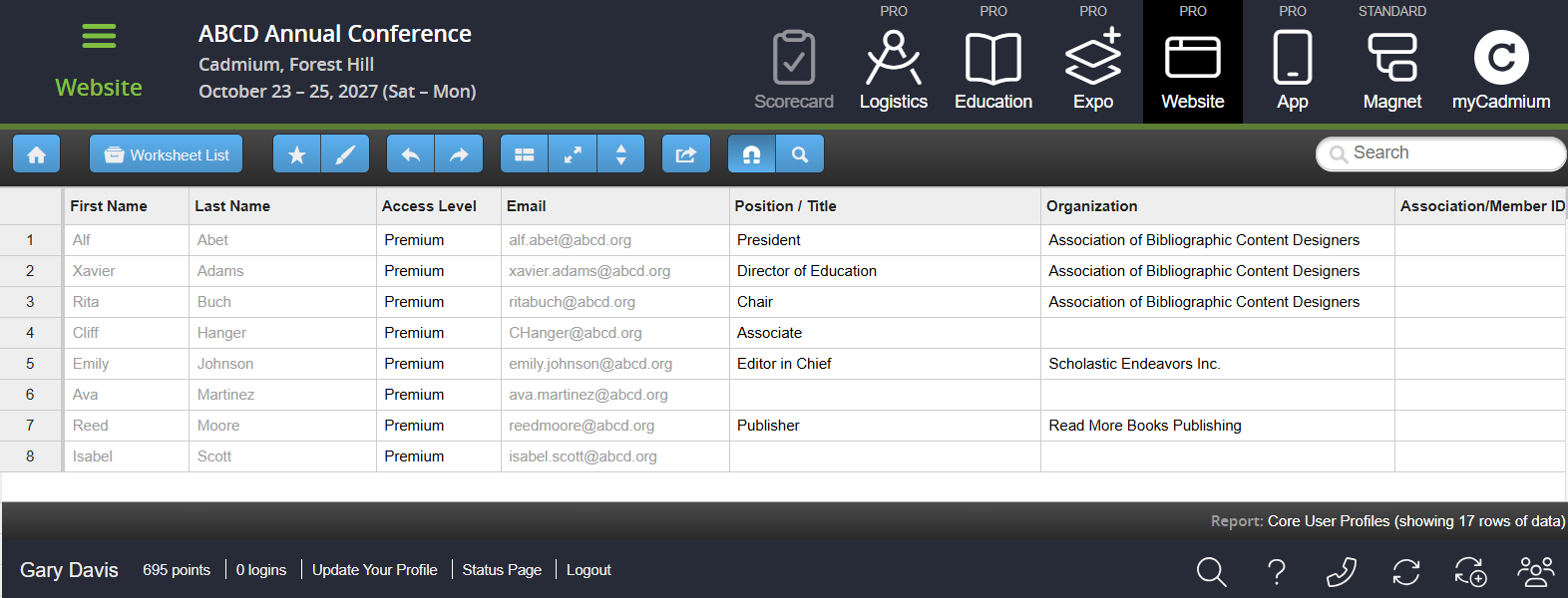
Fig. 1 - Locked First Name, Last Name, and Email Fields in a Worksheet.
Website – Login Popup Feature Removal
The login popup feature, which previously displayed the login page in a popup window when certain actions required authentication (such as favoriting a session), has been removed. This was previously controlled by a setting under the Login tab. Users will now be navigated directly to the login page instead of seeing the popup or the black speed bump overlay. (April 16, 2026)
Lead Capture Admin Portal – Updated Permissions
We've updated permissions for the Lead Capture Admin Portal to ensure only authorized personnel can access Lead Capture configuration and information for an event. If Lead Capture is being managed by Cadmium or a Cadmium Partner, access to the Lead Capture Admin Portal will be limited to those users. Users without the appropriate permissions will be directed to an access-denied screen. (Released on April 16, 2026)
Survey Magnet – Updated Sorting Logic on Admin Schedule Page
Updated the sorting logic on the Survey Magnet admin Schedule page so blocks within the same date now order by start and end time before block number (Fig. 2). This change applies to the date, room, and order sort views, bringing them in line with the chronological ordering already used in other views. (April 20, 2026)
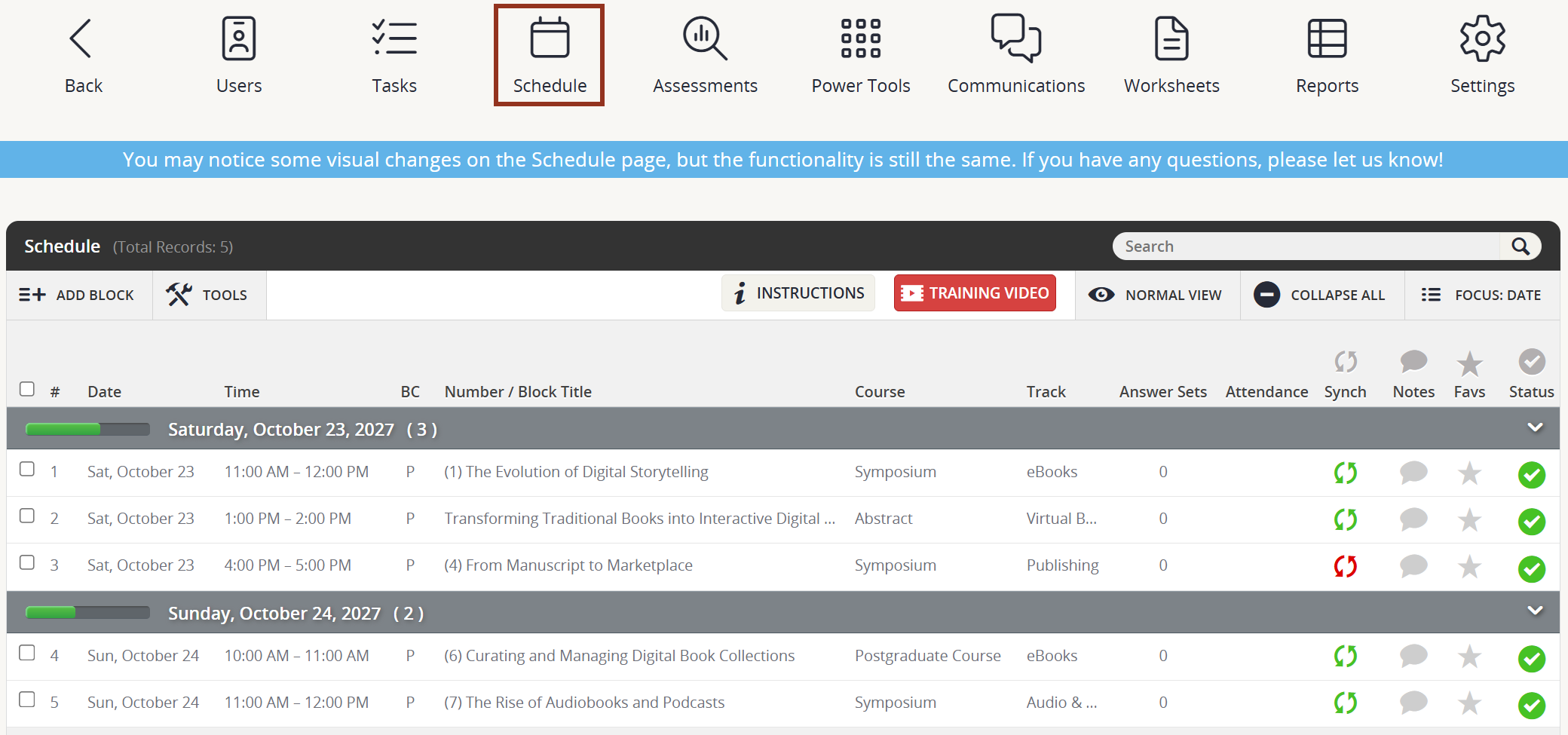
Fig. 2 - Survey Magnet Schedule Page.
Lead Capture Developer Kit – Expanded Test Account Profile Data
If you're offering the Lead Capture Developer Kit, you can now share our stock test account QR codes (Cadmium Basic, Cadmium Standard, and Cadmium Pro) with your exhibitors to support their API testing. Note, the QR codes for each test account are unique per event.
We've expanded the profile data tied to these accounts so that when exhibitors scan the test QR codes to verify their Developer Kit API implementation and complete end-to-end testing, more complete profile data will be returned.
A few things to keep in mind:
- This change is not retroactive it only applies to newly created events going forward. Existing events will not automatically have the expanded profile data on their stock test accounts.
- For existing events, the same profile data can be applied manually by editing the stock test account user profiles directly.
- Existing profile fields (first name, last name, email) on these accounts were not changed.
Profile data now included on stock test accounts for new events:
- pronouns: he/him/his
- organizationPosition: Owner
- organization: ABC Corporation
- phone: 123-456-7890
- address1: ABC Corporation
- address2: 123 South St.
- address3: Unit 5
- city: Denver
- stateProv: CO
- postalCode: 45678
- countryCode: USA
(Released April 20, 2026)
Website – Mobile Preview Button Removed From Tile Screen Editor
We've removed the Mobile Preview button and its associated QR code popup from the tile screen editor. This feature is no longer needed, and you can continue to preview your tile screen anytime using the Preview button. (April 21, 2026)
Lead Capture Exhibitor Portal – Booth Admins Can Now Self-Select Their Lead Capture Type
Booth Admins can now switch between the Licenses and Developer Kit types on their own in the Lead Capture Exhibitor Portal prior to making a purchase.
Note: The configuration setting "Are you selling licenses and/or the Developer Kit to exhibitors?" must be set to 'Yes' in the Lead Capture Admin Portal for this feature to display.
How it Works:
- A "Switch to Developer Kit" or "Switch to Licenses" button (labeled with the opposite of the booth's current Lead Capture type) will appear in the upper right corner of the home page, next to the "Purchase" button.
- If the booth has not yet been assigned any active licenses or a Developer Kit, clicking the button switches them directly to the opposite Lead Capture type so they can complete their purchase.
- If the booth already has items provisioned, the button will be disabled, and they'll be prompted to contact support. To resolve this:
- The event organizer or support should revoke any not-activated licenses or disable the provisioned Developer Kit, then update the exhibitor's type on the Summary page of the Lead Capture Admin Portal.
- If licenses have already been activated, the admin can still switch the type on the Summary page.
- The booth admin will need to refresh to see the update.
(April 24, 2026)
Mobile App (iOS and Android) – Smarter Data Delivery for the Mobile App
We've made some a major updates to our mobile app optimization initiative to improve how our mobile app receives data, delivering a faster and more stable experience for all users. Data is now shared with the mobile app automatically, eliminating the need to generate most zip files, and the app now checks for updates every 15 minutes during your event, a significant improvement over the previous hourly check. These enhancements happen behind the scenes with no action required on your part.
What this means for you:
- A smoother, more responsive app experience
- Greater stability with fewer interruptions
- Quicker access to the latest data
- No action required, improvements are automatic
For more tips, view our troubleshooting article. (April 30, 2026)
Education Harvester – Reviewer Messaging Now Works Independently of File Upload
Previously, the message field for contacting Reviewers was tied to the file upload process. This could cause issues with how messages were submitted and routed.
The Reviewer messaging and file upload functions are now handled separately. As a result, Speakers can send messages to Reviewers at any time, even after the upload deadline has passed, without needing to submit a file.
(April 30, 2026)
Fix
Eventscribe Mobile App (iOS & Android) – Author List Display Restored
An issue was resolved where author information was not appearing for certain presentations within the app. Author lists now display correctly across sessions, ensuring users can view complete presentation details as expected. No build required. (April 6, 2026)
Scorecard – Not Allowing Submissions Past Cutoff/Lock Date
The Scorecard includes a setting to lock submissions after a specified cutoff date and time. Previously, this lock was only applied when a user logged in, meaning users who were already logged in and actively working could continue editing or submitting past the cutoff without being stopped.
This has been corrected. The Scorecard now checks the cutoff date and time directly on task and submission pages. If a submission should be locked and a user attempts to access it, they will be redirected to the home page with the message: "{Submission Title} is now locked and no longer available to be edited."
Note: If a special access code has been granted, users with that code can still edit and submit after the cutoff date as intended. (April 21, 2026)
Expo Details & Logo Task Auto-Emails – Fixed & Updated
Auto-email notifications for the Expo Details and Logo tasks were not sending as expected. These emails were incorrectly dependent on a global email setting, meaning they would only send if both the individual task setting and the global setting were enabled. This has been corrected. Auto-emails for these tasks will now send whenever the individual task's auto-email setting is enabled, regardless of the global setting, consistent with how other tasks behave.
Additionally, the following improvements were made to the email itself:
- The tech support section now displays the correct phone number and email address.
- Emails will now come from donotreply@conferenceharvester.com.
(April 21, 2026)
Website/Mobile App – Chats Profile Photo Display Fix
Fixed a bug that prevented user profile photos from displaying in the chat window when uploaded as JPEG files. The Chats profile image now accepts .jpg, .jpeg, and .png as valid file types. (April 30, 2026)
Website – Fixed Error When Accessing Poster Tile on the My Experience Page
Users were unable to access the My Posters page when navigating to it via the Poster tile on the My Experience page. This issue has been resolved, and the My Posters page is now accessible from the My Experience page. (April 30, 2026)
Education Harvester – Reviewer Email Missing Login Credentials After Speaker File Upload
When a Speaker uploaded a file and the system was configured to notify Reviewers upon upload, the Reviewer notification email was missing the login URL, username, and access key needed to access the submission.
This issue has been resolved. Reviewer notification emails will now include the complete credentials block as expected.
(April 30, 2026)
Was this article helpful?
That’s Great!
Thank you for your feedback
Sorry! We couldn't be helpful
Thank you for your feedback
Feedback sent
We appreciate your effort and will try to fix the article